"Hoosier Ink" Blog

Showing posts with label Brainstorming. Show all posts

Tuesday, May 24, 2022

Putting the Cover BEFORE Writing the Book

Ok, you've heard of the expression "putting the cart before the horse, right?"  

Well, I've been having fun using Book Brush to design covers and back page matter to generate story ideas and THEN working the story from that point. Essentially, I've been coming up with story ideas from what I've been building onscreen. It's a unique approach...similar in concept to building the airplane while already flying.

I start with a front cover idea and then noodle on the story concept while working through that.
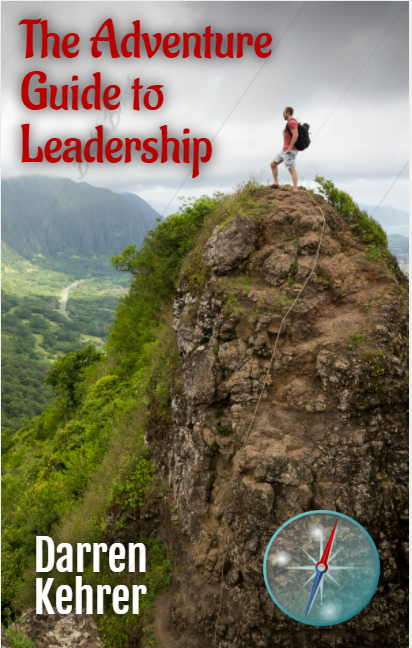
For me, the visual is MOST powerful. It's like the smell of writing.

After finishing the cover, I turn my attention to the back page and start working on that blurb..all with the front cover prominently displayed on the screen.

Maybe this is just a high level of plotting, but it's way more fun.

This is how I've developed several projects I'm working on.

It can even be used for short story ideas (with the idea in mind that a short story could be expanded into a fuller version, novel length creation.)

This is how my current WIP (non-fiction) project came into being "The Adventure Guide to Leadership," which is my FIRST venture into the world of non-fiction.

If you do not have access to Book Brush, there are other options out there.

So, give it a try. It is just a different way of brainstorming, but more visual in nature.


Tuesday, April 27, 2021

Nothing but Board

Today's post is one of simplicity revolving around visually sketching your brainstorms, plot ideas, mind maps, and story structure ideas. 


I do much of this with good old fashion pen/pencil and paper. Recently, I found a great little FREE iPad app by Qrayon called "Simple Whiteboard." It just replaces that and gives me a digital board....it even has the option of displaying the screen as white, blank, or grid pattern (graph paper).  You get a few color markers, choices of width, and then a magic eraser. That's it. Simple.

With ease, you can sketch, draw, scribble...

  1. Doodles
  2. Plot timelines
  3. Room layouts and scenes
  4. Cover design ideas
  5. Structures
  6. Maps (islands, towns, outposts, etc.)
...basically, anything you can do on paper. Then, you can share what you've created.

I've been using this app for many of these activities. Combined with my Apple Pencil, it's a tool that is simple, basic, and serves a basic purpose. (photo credit: Apple Store)

-Darren Kehrer


Wednesday, August 7, 2019

Brainstorming in "Full Imagination"


I don’t know about you, but as a writer, the only time I’m NOT brainstorming my next story idea (via multitasking while concentrating on my “day” job) is when I’m actually sitting in a theater watching a movie: Larger than life and right in front of me. At that point, all other processes are shut down and I am fully focused forward.

Earlier this year, I began adopting a brainstorming approach that involved “watching” my story possibilities unfold within the “theater of my mind.” On that screen, I can envision different actors portraying my characters, design the visuals of my environments, and work through different plot twists and turns…all geared towards developing each story element (and the many possibilities of) my work-in-progress. It’s the ultimate plug-n-play in story development. Adding some music to my writing time really completes the ensemble.

If you are a visual person, this type of brainstorming can really help you flesh out your story in such a way that you can change things on the fly. No typing, deleting, or pressing the “un-do” command. The next time you are brainstorming on your next great novel idea, let it play out in full surround-sound and in full-imagination within the theater of your mind. Should you ever decide to turn your story into a movie script, you will be one step ahead!

-Darren Kehrer